Calculation centers
Calculation centers are the different parts or steps of a
product creation or service sections.
Creating Calculation Centers is very simple as these are just
identifications and their calculation content will be defined
in the Model Calculations.
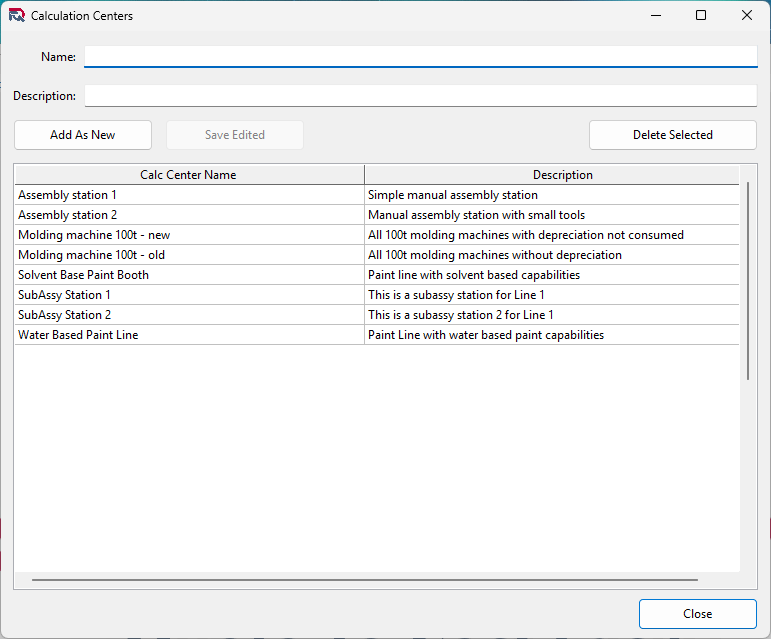
In the Calculation Centers form you can add, edit and delete calculation center names and descriptions.
Adding New Calculation Center
To add a new Calculation Center just type the name and the
description into the fields at the top of the form.
If you want to create a new Calculation Center based on a
previously defined name or description, select if from the
existing Calculation Centers list, change the name.
To create the new Calculation Center, click on the Add As New
button below the Name and Description fields.
Note! You cannot create Calculation Centers with the
name already used, but description can be the same as on
another Calculation Center.
Editing and existing Calculation Center
You can change the name and description of an existing
Calculation Center by selecting and double clicking on it from
the list of Calculation Centers.
Once you selected the Calculation Center, it will appear in
the name and description fields for editing. After editing
them you need to click on the Save Edited button. If the
edited name does not exist, the Calculation Center is saved
and will appear in the list below.
Deleting a Calculation Center
Calculation Center can be deleted, if the Calculation Center
does not appear in a Quote Calculation.
To delete a Calculation Center, select it from the list of
Calculation Centers and click on the Delete Selected button.
If the selected Calculation Center cannot be deleted the
application will show a dialog message to notify you about the
problem.